james@silent:~$ hostnamectlHướng dẫn Linux (Phần 1)
linux
Các lệnh kiểm tra hệ thống, lệnh cơ bản, tạo thư mục, phân quyền user.
1 Các lệnh kiểm tra Linux verion
 Static hostname: silent
       Icon name: computer-vm
         Chassis: vm 🖴
      Machine ID:
         Boot ID:
  Virtualization: oracle
Operating System: Linux Mint 22
          Kernel: Linux 6.8.0-60-generic
    Architecture: x86-64
 Hardware Vendor: innotek GmbH
  Hardware Model: VirtualBox
Firmware Version: VirtualBox
   Firmware Date: Fri 2006-12-01
    Firmware Age: 19y 1month 1d
james@silent:~$ lsb_release -a2 Khởi động lại Linux
sudo reboot3 Các lệnh kiểm tra directory
# change directory
cd

# go back one level

cd ..

# working directory hiện tại
pwd

# liệt kê file
ls
4 Các lệnh kiểm tra dung lượng ổ cứng
df -h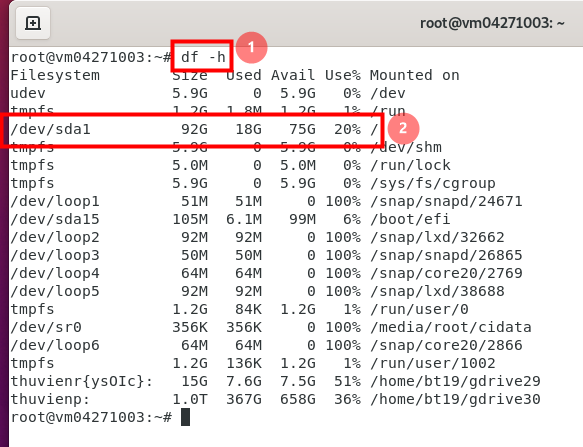
5 Các lệnh kiểm tra hệ thống
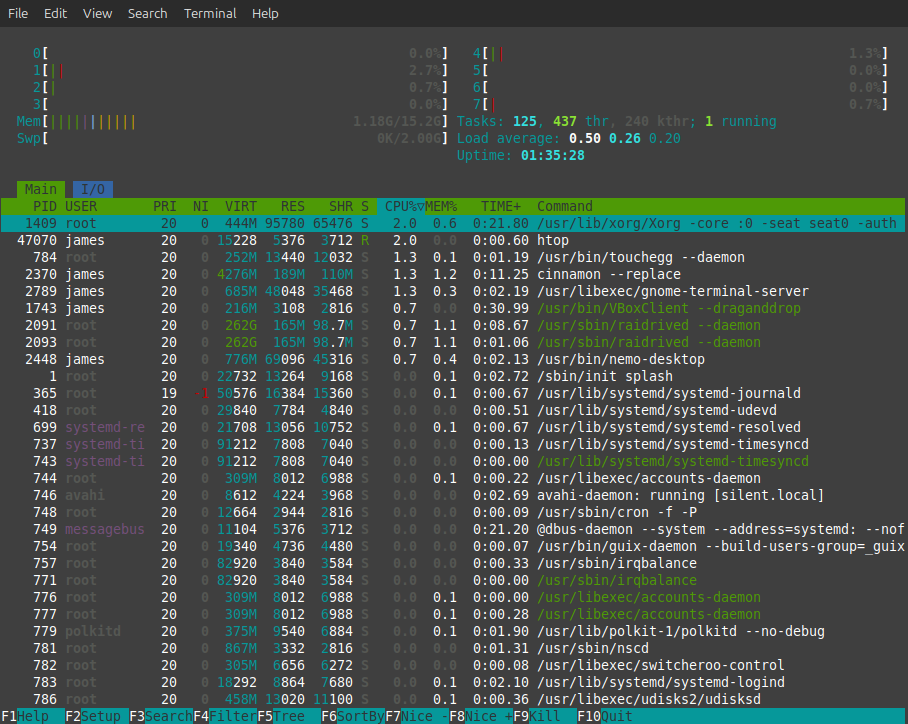
# gọi câu lệnh htop, nếu máy chưa cài đặt thì cài package này
sudo apt install htop
james@silent:~$ htopBằng cách này ta có thể sort xem process nào chiếm nhiều RAM hay CPU để có hướng xử lý.
james@silent:~$ uptime
 14:32:35 up  1:40,  1 user,  load average: 0,00, 0,10, 0,14
Một số câu lệnh khác
# you can use top or ps commands to check the CPU usage.
top

LC_ALL=C top -b -n 1 |grep ^%Cpu

# using ps: This will show you the % cpu usage for each process.
ps -eo pcpu,pid,user,args | sort -r -k1 | less

cat /proc/stat
Khi đang trong terminal, muốn thoát ra, ta gõ q sau đó Enter.
6 Các lệnh update package
7 Các lệnh uninstall package
Đầu tiên để remove một phần mềm nào đó trong Linux (ta gọi là package), thì ta cần xem phần mềm đó có đang chạy hay không. Ví dụ ta đang cài raidrive (phần mềm mount ổ cloud như ổ cứng trên máy tính), chạy dòng lệnh sau
https://docs.raidrive.com/en/cli/commands/status/
raidrivecli status # lệnh này trả về kết quả xem raidrive có đang running khôngSau đó ta liệt kê các phần mềm đang chạy trên máy, rồi gỡ cài đặt, xem chi tiết ở đây
https://www.cyberciti.biz/faq/linux-uninstall-package-software-using-the-cli/
apt list --installed

dpkg --list

dpkg --list | grep '^ii'

dpkg --list | grep -i 'raidrive' # kiểm tra xem có package nào tên là raidrive

sudo apt remove raidrive
8 Nguồn học Linux
https://www.server-world.info/en/
https://academy.hackthebox.com/course/preview/linux-fundamentals