quarto add quarto-ext/fontawesomeHướng dẫn Quarto Blog
quarto
bootstrap
1 Cách đổi icon ở trang About
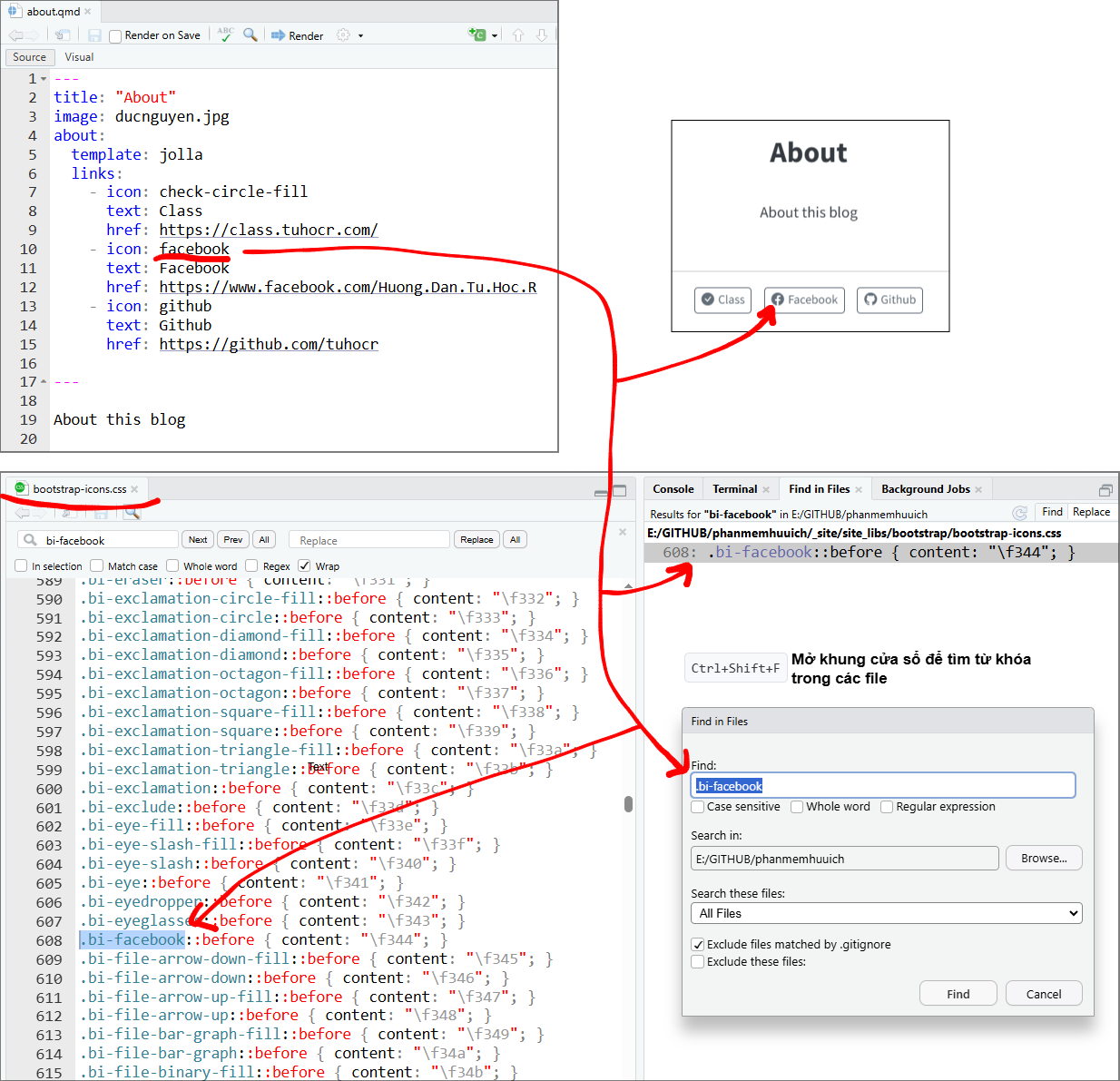
Khi tạo blog bằng Quarto, nếu bạn muốn thay đổi icon ở trang About.qmd thì áp dụng cách sau.
Tìm icon ở đây https://icons.getbootstrap.com/ sau đó thay keyword vào được.
2 Cài đặt Extension Font Awesome
https://github.com/quarto-ext/fontawesome
Ta gõ ở Terminal
Sau đó trong file .qmd, ví dụ muốn chèn logo thì ta ghi câu lệnh sau
{{< fa brands r-project title="R programming language" >}} Để tìm các icon khác, bạn search ở đây https://fontawesome.com/icons/r-project?f=brands&s=solid
3 Cách gõ keyboard shortcut
https://quarto.org/docs/authoring/markdown-basics.html#keyboard-shortcuts
{{< kbd Ctrl+Shift+F >}}Ctrl+Shift+FCtrl+Shift+F
4 Cách chia 2 cột
https://quarto.org/docs/output-formats/page-layout.html#css-grid
5 Chèn emoticons
https://www.freecodecamp.org/news/all-emojis-emoji-list-for-copy-and-paste/
https://www.unicode.org/emoji/charts/emoji-list.html
https://pb-old-notes.netlify.app/2021/04/19/using-emojis-in-r-and-rmarkdown/
Cách chèn đơn giản là bạn insert file .gif như bình thường
Dùng dòng lệnh  sẽ ra hình này 
https://forums.mobirise.com/plugins/EmojiExtender/emoji/yahoo/preview.html
https://usefulshortcuts.com/yahoo-messenger/smileys-emoticons.php
6 Thay đổi màu nền code chunk
https://jofrhwld.github.io/blog/posts/2025/03/2025-03-11_code-chunk-css/
7 Hướng dẫn làm website
8 Cách chia tab
::: {.panel-tabset}
## ** RStudio**

yes

## ** Positron**

ok

## ** Command line**

happy
:::yes
ok
happy
https://github.com/UCSB-MEDS/creating-quarto-websites/blob/main/index.qmd
9 Cách include file
10 Setup RSS feed
11 Custom formatting of components
https://www.andreashandel.com/posts/2025-03-05-custom-quarto-divs/index.html
12 Setup .bat file để render tự động
https://www.r-bloggers.com/2023/06/how-to-use-a-windows-bat-file-to-execute-an-r-script/
13 Tham khảo
Common Problems with Quarto (and some solutions) https://qmd4sci.njtierney.com/common-problems.html
https://mickael.canouil.fr/posts/2023-05-30-quarto-light-dark/
Blog này có thể dùng làm template https://pb-old-notes.netlify.app/