Câu 1
Bạn có dữ liệu sau về thông số đo lường của các cây black cherry.
   Girth Height Volume
1    8.3     70   10.3
2    8.6     65   10.3
3    8.8     63   10.2
4   10.5     72   16.4
5   10.7     81   18.8
6   10.8     83   19.7
7   11.0     66   15.6
8   11.0     75   18.2
9   11.1     80   22.6
10  11.2     75   19.9
11  11.3     79   24.2
12  11.4     76   21.0
Bạn hãy xuất ra file Excel và có định dạng format như sau.
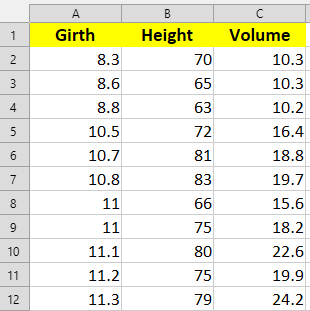
Cụm lệnh sau sẽ thực hiện theo logic:
trees -> df

library(openxlsx)

# lệnh này save file .xlsx như thông thường (without format)
# openxlsx:::write.xlsx(df, "df_trees.xlsx")

wb <- openxlsx:::createWorkbook()

openxlsx:::addWorksheet(wb, "Sheet 1")

openxlsx:::writeData(wb, "Sheet 1", df)

header_style <- openxlsx:::createStyle(fontSize = 12,
                            fontColour = "black",
                            fgFill = "yellow",
                            textDecoration = "bold",
                            halign = "center")

openxlsx:::addStyle(wb,
         sheet = "Sheet 1",
         header_style,
         rows = 1,
         cols = 1:ncol(df),
         gridExpand = TRUE)

openxlsx:::saveWorkbook(wb, "dataset/df_styled.xlsx", overwrite = TRUE)